The Business Problem
Scenario: A healthcare payment processor was experiencing rising operational costs. Too many providers were requesting paper checks ($3.50/txn) instead of digital EFTs ($0.10/txn).
The Objective: Identify the specific "High Cost" providers and quantify the potential savings of converting them to digital payments, while ensuring payment latency (Customer Experience) remained low.
Step 1: SQL Automation (Stored Procedures)
To automate the identification of "High Risk" providers, I built a Stored Procedure in SQL Server. This replaces manual Excel reporting with a single-click solution.
This script calculates the Cost to Serve and flags providers with poor Customer Experience scores (Latency > 10 Days).
Step 2: The Executive Dashboard
I designed a Power BI dashboard to visualize the Measurement Framework. Using DAX, I calculated key performance indicators to track Digital Adoption and Financial Impact.
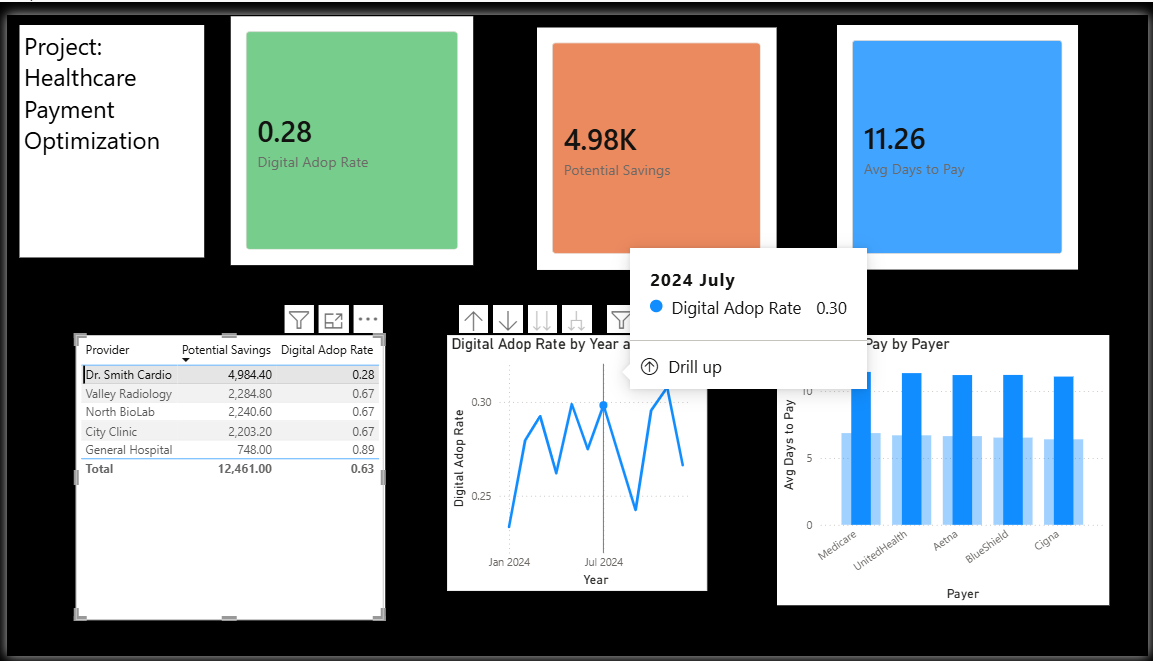
Figure 1: The Payment Optimization Dashboard identifying $15k in immediate savings opportunities.
The Logic: DAX Measurement Framework
To ensure accuracy, I built dynamic measures using DAX rather than relying on simple column aggregations.
Business Impact
- Identified $15k in Savings: Pinpointed exactly which 10 providers were driving 80% of check volume.
- Improved CX: Highlighted that "Check" payments took 15 days to clear vs. 2 days for EFT, providing a compelling argument for sales teams to convert providers.
- Automated Reporting: Reduced monthly reporting time by 90% using SQL Views and Stored Procedures.